Array Methods You Must Know

Introduction
Before we begin, let's understand a little about what is array and which superpower it's holds.
If JavaScript is the Engine of the web browser then Array is the fuel tanks. They don't just a hold a data but they organize it or modified it too, So you can actually do something useful with those data.
Arrays are variables which can hold more than one values.
You create an array using square brackets [], with items separated by commas.
Example:
const fruits = ["Apple", "Banana", "Cherry", "8", "true"];
Arrays use zero-based indexing, meaning the first item is always at position 0.
Accessing items: Use the index number in brackets:
fruits[0]is "Apple".Length: The
.lengthproperty tells you how many items are inside.Mixed Data: Unlike some languages, JavaScript arrays can hold different types (strings, numbers, booleans, or even other arrays) at once.
In this blog we re going to discussed what are the array methods and why we need ?
So, let's understand with example
let's consider your array as a grocery list on a notepad. You’re in the kitchen, and you suddenly remember to add some items. So, you need to manage what’s on that paper.
In JavaScript, some tools actually cross things off or add items to your physical paper (Mutating Methods), while others "take a photo" of the list and edit the photo instead, leaving your original paper untouched (Non-Mutating Methods).
This is how it works. we have two array methods to manipulate over data.
Mutating Methods
Non-Mutating Methods
push()
You can add one or more elements in array using push() method.
push() method is mutating method, it's returns the new length of that array.
Think of it like adding a new car to the back of a train.
Syntax:
array.push(element1, element2, ..., elementN);
Example:
Adding a single element.
Code:
const fruits = ['apple', 'orange'];
fruits.push('banana');

console.log(fruits);
// Output: ['apple', 'orange', 'banana']

console.log(fruits.length);
// Output: 3
Adding a multiple element.
Code:
const numbers = [1, 2];
numbers.push(3, 4, 5);

console.log(numbers);
// Output: [1, 2, 3, 4, 5]

console.log(numbers.length);
// Output: 5
pop()
The pop() method removes the last element from an array and returns that element.
It's a mutating method that changes the length of the original array.
Syntax:
let removedElement = array.pop();
Example:
Remove the element from the last an return it new array.
const snacks = ['Apple', 'Banana', 'Cherry'];

const lastSnack = snacks.pop();

console.log(lastSnack); // Output: 'Cherry'
console.log(snacks);    // Output: ['Apple', 'Banana']
- Returns the Element: If you try to
pop()an array that has nothing in it, it won't throw an error. It simply returnsundefined.
shift()
The shift() removes the very first element of an array and shifts everything else down by one index.
When you use .shift(), two things happen:
The first element (at index 0) is removed from the array.
That removed element is returned so you can use it.
Syntax:
array.shift()
Example:
Remove 'kuku' from index 0.
const Rabbit = ['kuku', 'muku', 'chaku'];

const firstRabbit = Rabbit.shift();

console.log(firstRabbit); // Output: 'kuku'
console.log(Rabbit);       // Output: ['muku', 'chaku']
Mutates the Array: It changes the original array's length.
Returns the Element: If the array is empty, it returns
undefined.
unshift()
The unshift() method is like a VIP treatment. When you need to add one or more elements to the beginning of an array.
It opposite to the push() method, push () adds elements from last and unshift() adds elements from beginning.
It's returns the new length of the array.
Syntax:
array.unshift()
Example:
Add 'puchu' at the beginning of the array.
let rabbit = ['kuku', 'muku'];

// Adding one element
let newRabbit = rabbit.unshift('puchu');

console.log(rabbit);     //Output: [ 'puchu', 'kuku', 'muku' ]
console.log(newRabbit ); // Output: 3
- Important note: For very large arrays,
unshift()is slower thanpush(). This is becausepush()just sticks something on the end, whileunshift()forces the computer to re-index every single element in the array.
map()
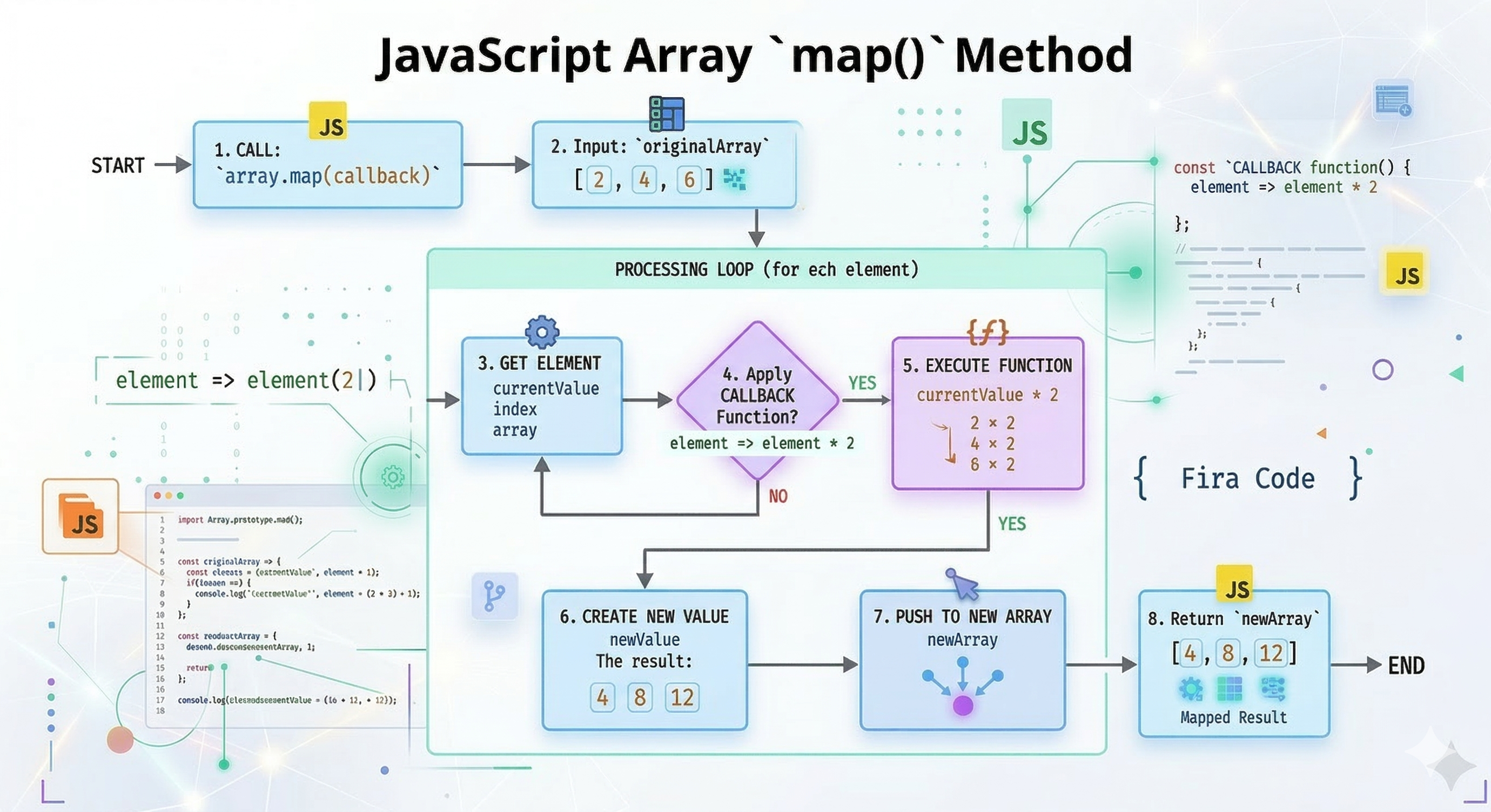
It’s creates a new array by performing some operation on each array element.
map() does not change the original array.
Syntax:
The method takes a callback function as its argument. That function can take three parameters:
item: The current element being processed (Required).index: The position of the current element (Optional).array: The original array itself (Optional).
const newArray = oldArray.map((item, index, array) => {
  // Return the new value for this position
});
Example:
A list of prices [10, 20, 30] and you want to double them.
const prices = [10, 20, 30];
const doubled = prices.map(price => price * 2);

console.log(doubled); //Output: [20, 40, 60]

console.log(prices);  //Output: [10, 20, 30] (Original remains untouched)
Flowchart showing how map works:
filter()
The .filter() method is used to "sift" through an array and pick out only the items that meet a specific condition. an array with values that passes a test, creates a new array.
Original Array: Stays exactly the same (Immutability).
New Array: Can be the same length, shorter, or even empty
[].
Syntax:
const filteredArray = array.filter((item, index, array) => {
  return item > 10; // Only items greater than 10 pass the test
});
callback():The function must return a Boolean (trueorfalse).item: The current item being looked at.index: The number position () of the current item (Optional).array: The original array being filtered (Optional).
Example:
Only keep ages that are 18 or older.
const ages = [12, 18, 25, 14, 30];

const adults = ages.filter(age => age >= 18);

console.log(adults); //Output: [18, 25, 30]
Iteration: JavaScript looks at every item in your array one by one.
The Test: It runs your condition (e.g.,
age >= 18).The Result: If the condition is
true, the item is added to the new array. If it'sfalse, the item is skipped.
Flowchart showing how filter works:

reduce()
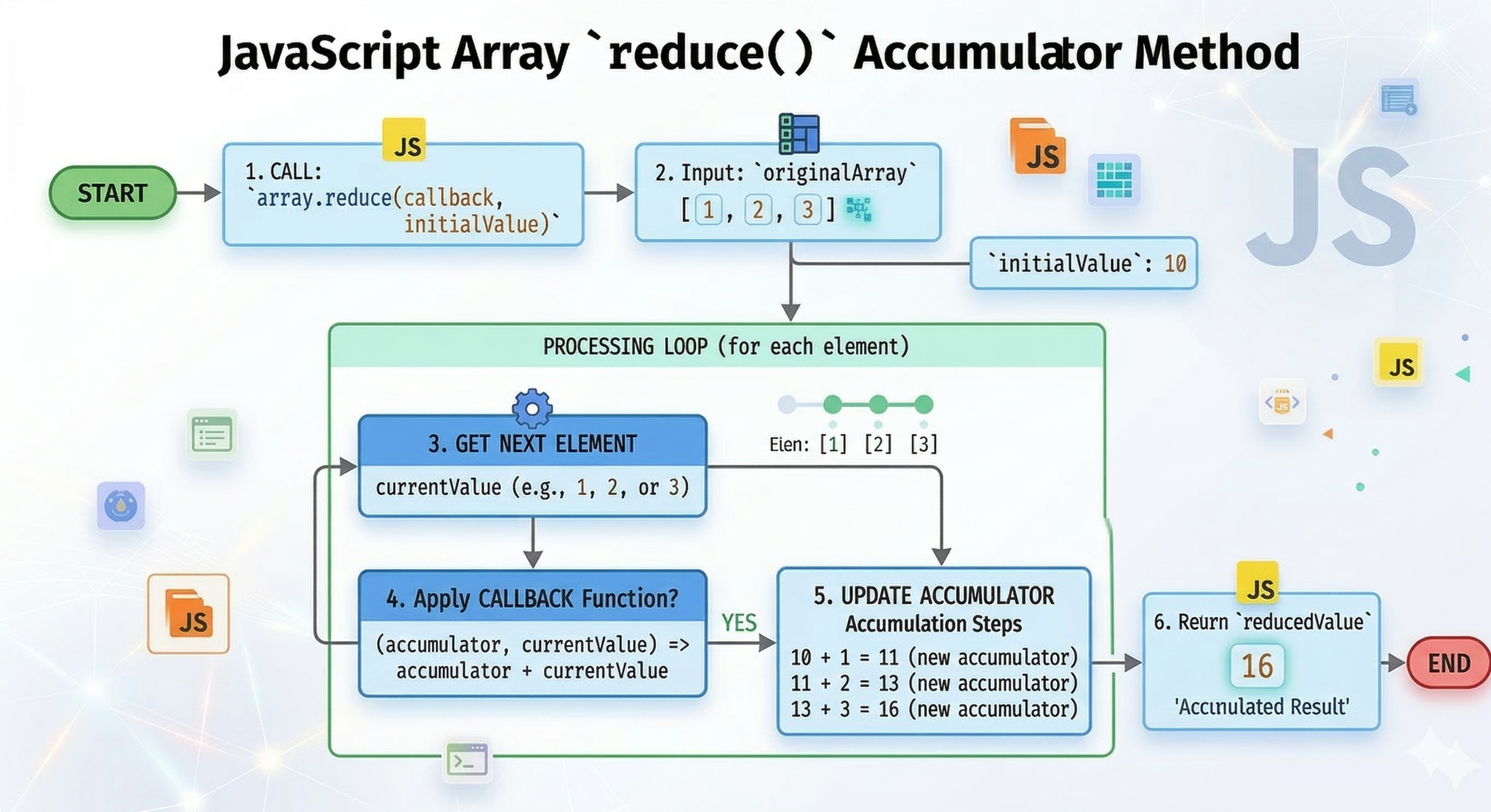
map() transforms each element and filter() selects specific elements, reduce() allows you to boil an entire array down to a single value.
That "single value" can be anything: a number, a string, an object, or even another array.
Syntax:
array.reduce((accumulator, currentValue) => {
  // Logic goes here
}, initialValue);
Accumulator (
acc): The "bucket" that holds the running total or the result from the previous iteration.Current Value (
cur): The current element being processed in the array.
Example:
const prices = [10, 20, 30, 40];

const total = prices.reduce((acc, cur) => {
  return acc + cur;
}, 0); // 0 is the initialValue

console.log(total); // 100
Simple visual for reduce accumulating values:
forEach()
The .forEach() method is the modern way to "iterate" (loop) through an array. It’s calls the function, once for each array element.
Syntax:
array.forEach((element, index, array) => {
  // Do something with 'element'
});
The .forEach() method executes a provided function once for each array element.
Returns:
undefined. It literally returns nothing.Original Array: Stays the same (unless you manually change it inside the loop).
Purpose: To perform side effects.
Example:
const tools = ["Git", "Vercel", "Netlify"];

tools.forEach((item, index) => {
  console.log(`\({index}: I am using \){item}.`);
});
//Output
0: I am using Git.
1: I am using Vercel.
2: I am using Netlify.
item: The current element being processed (e.g., "Git").index: The numerical position of the item (0, 1, 2...).
Assignment Idea
1 . Create an array of numbers
Code:
const numbers = [2, 5, 8, 12, 15];
2 . Use map() to double each number
Code:
const doubled = numbers.map(num => num * 2);

console.log(doubled);
//Output: [4, 10, 16, 24, 30]
3 . Use filter() to get numbers greater than 10
Code:
const filtered = doubled.filter(num => num > 10);

console.log(filtered);
// Output: [16, 24, 30]
4 . Use reduce() to calculate total sum
Code:
const totalSum = filtered.reduce((accumulator, current) => accumulator + current, 0);

console.log("Final Sum:", totalSum);
//Output: Final Sum: 70
Conclusion
Arrays let you store and organize collections of values, and array methods are the tools you use to add, remove, transform, or inspect those values. Some methods mutate the original array, while others return a new array (non‑mutating), knowing the difference helps you avoid bugs and choose the right approach. Mastering these methods makes data manipulation simpler, more predictable, and your code easier to maintain.


